
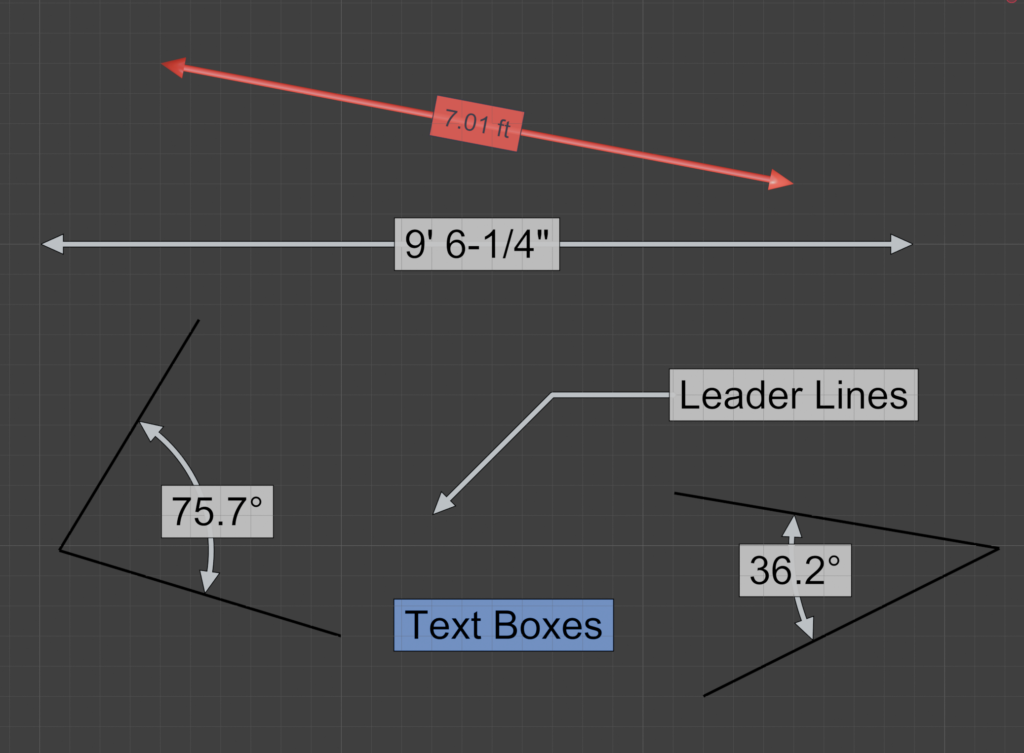
Create renderable, live CAD-style dimensions directly in Blender’s 3D View.
- Extension ID
dimension_tool- Current Version
- 0.2.6
- Minimum Blender Version
- 5.1.0
- Maintainer
- Jace Priester
- License
- GPL-3.0-or-later
- Repository
- https://jacepriester.com/blender-repo
Overview
Dimension Tool adds a dedicated Dimension Tool panel to the 3D View sidebar for creating renderable measurement annotations. It is intended for scenes that need CAD-like visual callouts inside Blender rather than temporary viewport-only measurements.
Dimensions are built from real Blender objects, including controller objects, grab handles, lines, arrows, text, and optional text backgrounds. The extension keeps those objects synchronized through Blender update handlers so annotations can remain live as the scene changes.
Major Features
- Linear dimensions: click two points in the 3D View to create a measured distance label.
- Distance between objects: create a dimension between exactly two selected objects.
- Angular dimensions: create 3-point angular dimensions from two tips and a shared vertex.
- 4-point angular dimensions: create an angle from two line segments using four control points.
- Leader lines: add renderable callout leaders with extend, subdivide, and smooth options.
- Text boxes: place standalone renderable annotation text in the scene.
- Live grab handles: adjust dimension endpoints, offsets, text placement, and angular arcs after creation.
- Local overrides: use shared scene defaults or override style settings per selected dimension.
- Style library: save, load, import, export, and apply reusable dimension styles.
- Flexible units: use scene units or force raw Blender units, metric, imperial, architectural feet-and-inches, degrees, or radians.
- Measured value recording: record displayed and raw values to a Blender text datablock, including frame/value rows for animated scenes.
- Curve measurement: measure a linear dimension along a selected curve between projected grab-handle points.
- Object attachment: drive a dimension grab handle from another object’s world location.
Basic Usage
- Install and enable the extension in Blender.
- Open the 3D View sidebar and select the Dimension Tool tab.
- Choose a creation command such as Linear Dimension, Leader Line, Angular 3-Point, Angular 4-Point, or Text Box.
- Click the requested points in the 3D View. For a standard linear dimension, click the start point and then the end point.
- Select the created dimension or one of its handles to edit placement, offsets, text, attachment, or style settings.
- Use Scene Style for shared defaults, or edit the selected dimension’s local override settings when a dimension is selected.
Panel Commands
- Linear Dimension
- Starts an interactive two-click dimension drawing tool.
- Distance Between Objects
- Creates a dimension between two selected objects.
- Leader Line
- Creates a renderable leader/callout line. Selected leader lines can be extended, subdivided, or smoothed.
- Angular 3-Point
- Creates an angular dimension by clicking first tip, shared vertex, and second tip.
- Angular 4-Point
- Creates an angular dimension from endpoint A, inner point A, inner point B, and endpoint B.
- Text Box
- Creates standalone annotation text using the same renderable text styling system.
- Duplicate Dimension
- Duplicates selected linear and angular dimensions with their child objects.
- Delete Dimension
- Deletes selected dimensions and their generated child objects.
Style and Display Options
Dimension Tool supports both scene-wide defaults and per-dimension overrides. The main style modes are 2D with Outline, which uses flat mesh geometry with a contrasting border and fill, and 3D Geometry, which uses curve lines with separate 3D arrowheads.
Available style controls include:
- Font, text size, text rotation, and text color.
- Arrow size, line thickness, offset line thickness, outline thickness, and colors.
- Optional text background, background outline, padding, and background colors.
- Z-fighting offset controls for separating text, backgrounds, lines, and arrows from nearby surfaces.
- Shadow casting toggle for generated dimension objects.
- Automatic snapping of dimension offsets back to zero when close to center.
Units and Formatting
Linear dimensions can follow Blender’s scene unit settings or override display units per scene or per dimension. Supported display modes include raw Blender units, metric units, imperial units, and architectural formatting for imperial measurements.
- Metric units: adaptive, kilometers, meters, centimeters, millimeters, or micrometers.
- Imperial units: adaptive, miles, feet, inches, or thou.
- Architectural fractions: whole inches through 1/64 inch.
- Angular units: degrees or radians.
- Precision controls and optional trailing-zero trimming for linear and angular labels.
Style Library
The extension includes a persistent style library for reusable dimension presets. Styles can be added from the current scene style or selected dimension, applied back to the scene or the selected dimension, saved, saved as new styles, deleted, reloaded, exported to JSON, and imported from JSON.
The style library is stored as style_library.json in Blender’s user configuration area under
a dimension_tool folder. Older style libraries stored inside the extension folder are migrated
when possible.
Permissions
This extension requests file access so it can save dimension style presets in the user’s Blender configuration folder. The manifest declares this as:
Save dimension style presets in the user config folder.
Generated Scene Data
Dimension Tool creates and manages Blender objects for each annotation. These generated objects may include controllers, handles, lines, arrows, text objects, background meshes, and flat rendered geometry. The extension uses object tags internally to track ownership and remove orphaned dimension children when needed.
New dimensions can be added to the active collection, a shared Dimensions collection, or a named collection configured in the panel.
Notes
- The extension uses Blender update, frame-change, load, timer, and message-bus handlers to keep dimensions synchronized.
- Text overrides can replace measured values with custom labels. The override text supports
\nfor new lines. - Dimension values can be recorded into Blender text datablocks for frame-by-frame measurement output.
- Dimension grab handles can be attached to objects so dimensions follow object movement.